
How to block Instagram Reels and YouTube Shorts on your child's phone, without blocking the whole app
End the endless scroll and keep the apps your child uses to learn and talk to family.
Why short videos, specifically
Most parents don't object to YouTube or Instagram. They object to the part that never ends: a feed of short videos that plays the next one before your child has decided whether they want it.
India's Economic Survey 2025-26 made the same point. It asked platforms for age-appropriate defaults and named auto-play among the features that need them.
The problem with blocking the whole app
Blocking YouTube also blocks the maths explainer. Blocking Instagram also blocks the class group chat. Children notice, feel punished, and look for a way around it. That's usually the end of the conversation, not the start.
What eRaksha does instead
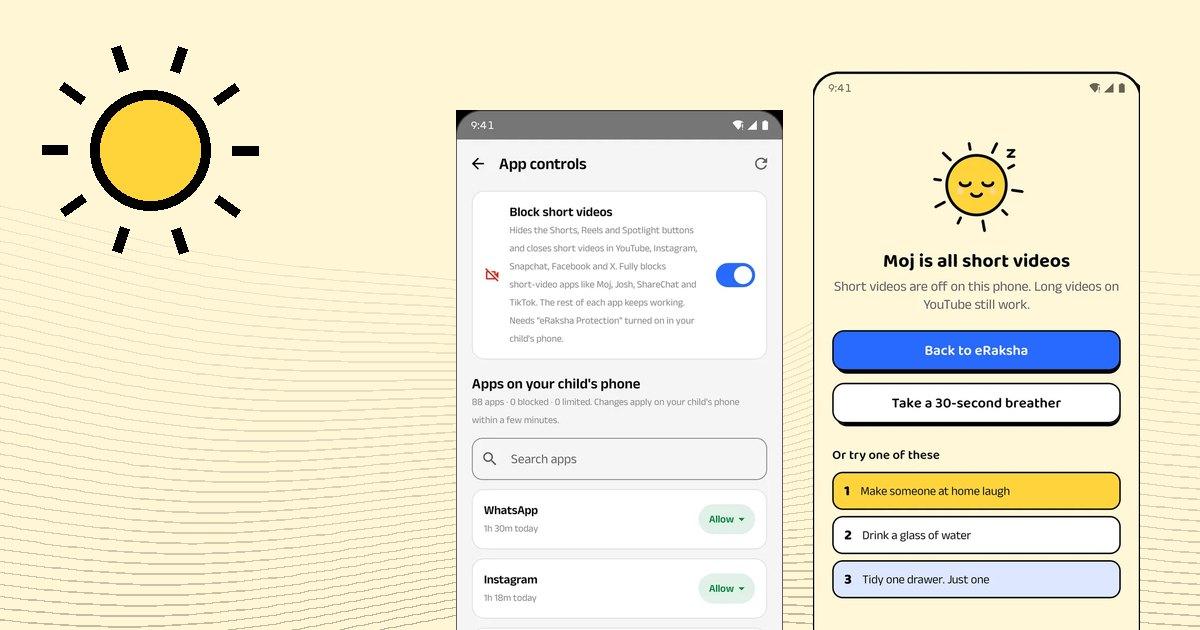
One switch in eRaksha Parents → App controls → Block short videos:
- Hides the Shorts, Reels and Spotlight buttons and closes short videos in YouTube, Instagram, Snapchat, Facebook and X.
- Keeps the rest of each app working. Long videos on YouTube, messages and search are untouched.
- Fully blocks apps that are all short videos, like Moj and ShareChat.
- Shows your child a kind screen, not a dead end. It says short videos are off on this phone, and offers a 30-second breather or something else to do.
You see a count of how many times a short video was stopped, never which video it was.
How to bring it up with your child
- Say it before you switch it on. "I'm turning off Shorts and Reels. You can still watch anything on YouTube and message your friends."
- Explain the reason in one line. "Short videos are built to keep you scrolling, and I'd rather you choose what you watch."
- Agree how to ask for more. eRaksha Kids has a one-tap request for more time, so asking is easier than sneaking.
- Review it together in a week. The weekly view in eRaksha Parents shows patterns, and one thing worth talking about.
A note on how it works
eRaksha uses Android's Accessibility service only for three things: hiding short-video buttons, closing apps you've blocked, and stopping eRaksha being removed without you. It doesn't record the screen, take screenshots or read messages. eRaksha Kids shows your child exactly what you can and can't see.